
Online CNC machining returns a lead time in the same minutes it returns a price, and the number is only as good as the inputs behind it. Behind the checkout screen, the quoted lead time is an estimate of the factory schedule — programming, material, machining, inspection, and finishing — derived largely from the geometry you upload, and the delivery estimate adds the shipping leg that lands the parts at your door. This guide breaks that stack apart: what the quoted lead time actually estimates, which features and materials quietly extend it, how revisions restart the calendar, and how to plan an online order that arrives when you need it.
What does the quoted lead time actually estimate?
When an online service shows a lead time alongside the price, it is estimating the time the factory needs from order to dispatch. The estimate is built from the same stack as the price: the programming and scheduling the part requires, the material availability, the machining time the geometry implies, the inspection the tolerances demand, and any finishing steps the order carries. Most of the machining-time estimate is derived automatically from the model — the analyzer reads the geometry the way it reads the cost — which is why a clean, manufacturable model produces a faster and more reliable lead-time estimate than a borderline one.
The stages that follow the estimate are the usual ones: programming and prove-out, material procurement, queue position on the right machine, machining, secondary operations, and inspection before dispatch. Cutting time is usually the smallest part of the calendar; queue position and inspection decide the date. The buyer who reads the quoted lead time as a process estimate rather than a promise knows which questions to ask when the date matters — is the material stocked, which machine class runs the part, and how long does the inspection on the critical characteristics take?
How does the model change the schedule before it is ever machined?
The model drives the schedule twice: once through the automated design-for-manufacturing check that decides whether the part can even be made as designed, and once through the process estimate that flows from the accepted geometry. A model that triggers design-for-manufacturing flags — a wall too thin to machine rigidly, a pocket too deep for standard tooling, a feature that forces an extra setup — is a model whose lead time carries the consequences of those flags. The analyzer's feedback is therefore schedule information, not just cost information: resolve the flags before ordering, and the quoted lead time shortens with the machining time it estimates.
Threads, deep blind holes, fine finishes, and tight callouts each add estimated minutes and inspection care, and each extends the lead time in the quote. The geometry levers that reduce the price — envelope, radii, standardized holes, sensible wall thickness — are the same levers that reduce the schedule. A part designed for manufacturability is a part whose online quote shows a shorter lead time, because the estimate is honest about the operations the geometry requires. Upload the model, read the flags and the lead time together, and fix the design before you commit rather than after the calendar has started.
Which materials and finishes move the date?
Material availability is the first schedule risk after the geometry. Aluminum and the free-machining grades are stocked at most factories, which is why simple aluminum parts quote the shortest lead times. Exotic alloys — titanium, specialty stainless, Inconel — may need to be ordered in the right bar size, and the material procurement leg joins the schedule before the first toolpath exists. Selecting a stocked grade at quoting keeps the material leg at zero; selecting a grade the factory must source moves the date before machining even starts.
The quantity you select in the order flow also shapes the schedule, though differently than the price. A one-piece prototype runs on a fast track with the setup paid once; a production quantity runs in batches and the machining time repeats per piece, so the calendar grows with the volume. What online quoting makes visible is the boundary: at some quantity the order crosses from a short prototype run into a production run that needs its own scheduling window, and the quoted lead time reflects that crossing. Quote the quantity you actually expect, and read the lead time at that quantity rather than extrapolating from the one-piece number. If the volume is large, ask whether the order can be released in batches, because a first batch that ships while the rest is still running is often the schedule that saves the launch date.
Finishing moves the date a second time. Anodizing, bead blasting, passivation, and plating each add a process step with its own queue, and finishing that routes to a partner adds a hand-off with its own schedule. Selecting a finish in the order flow prices and dates it; adding it after the order moves both. The FAQs page covers the materials and finishes this service runs and how they affect the quoted schedule in practice.
How do tolerance and inspection extend the schedule?
Tight tolerance is a schedule driver as well as a cost driver. Features that fall inside the standard tolerance block are verified with routine inspection; features pulled to ±0.003 mm add finishing passes and full measurement of every critical characteristic; surfaces below what milling holds move to grinding, an operation with its own queue and its own inspection. The inspection plan on a part with critical callouts has real calendar weight — each critical dimension is verified, reported, and reviewed before the lot can ship. The quality page shows how CMM and surface measurement are structured on shipped lots, which is the inspection time a qualified order carries.
The buyer's lever is the tolerance block. Reserve the tight band for the bores, sealing faces, and locating surfaces that earn it, and let the rest ride the standard block the service prices by default. Every unnecessary tight callout adds finishing and inspection time, whether the function needs it or not, and on a part where the geometry already carries long estimated minutes, the tolerance-driven inspection is the difference between a quoted lead time that fits your schedule and one that does not.
Which design choices stretch or shorten the quoted schedule?
The design decisions you make before uploading the model are the largest single influence on the quoted lead time, because the estimate is built from the geometry. The choices that stretch the schedule are the ones that add operations or slow cutting: a large envelope that forces bigger raw stock and longer roughing passes; deep pockets that need conservative depths of cut and more passes; thin walls that require support and slow feeds to avoid deflection; small internal radii that force small tools with slow removal rates; and many separate setups across faces that add fixture and alignment time. Each of those shows up in the process estimate as extra minutes, and the minutes become days on the quoted calendar.
The choices that shorten the schedule are the mirror image. Keep the envelope tight to the function so the stock is small and the roughing passes are few. Design for standard tools — the largest internal radii the geometry tolerates, standard hole sizes and thread depths — so the shop uses its normal tooling rather than specials. Keep the feature count low enough that the part needs a sensible number of setups, and keep the tolerances inside the standard block except where the function earns a tight callout. A part that reads as routine to the analyzer is a part whose quote shows a short, reliable lead time; a part that reads as borderline is a part whose schedule carries the risk of the borderline features. The automated design-for-machining feedback the service returns with the quote is the cheapest schedule-review tool available — read it as a production plan, fix the flags, and re-quote before you commit.
What happens to the schedule when the order needs a revision?
A drawing change after the order is placed restarts the process: the model must be re-analyzed, the program updated, and the affected work re-planned, and if the change arrives after machining has started, finished or in-process parts from the old revision must be quarantined. Most of the schedule is not cutting time, so a revision that touches geometry already scheduled pushes the order back in the queue rather than simply adding days to the old date. Check the revision policy before you order, and understand what a change costs in both money and calendar before you request one.
The way to keep revisions cheap is to order the model you intend to make. Resolve the design-for-manufacturing flags, confirm the material and finish, and let the engineering review happen before checkout rather than after it. When changes are genuinely unavoidable, bundle them into a single revision rather than releasing several across the production window — each separate change restarts the schedule and the queue position.
What does shipping add to the total time?
The machining lead time ends at the factory's dispatch; the arrival date adds the shipping leg. The delivery estimate depends on your location and the freight mode you select at checkout — air freight is fast and suits prototypes and first articles, while economy or sea shipping suits production volume. The two schedules add together, so a part with a two-week machining lead time and a five-week sea leg is a seven-week order; planning it as two weeks is how launch dates slip.
Select the freight mode to match the part's role. A prototype exists to answer questions, so fly it — the delivery is days, and the cost is trivial against the value of a faster design loop. A production quantity with a stable design can ride the slower mode, because the freight cost amortizes across the volume and the lead time was planned for it. The contact page and the order flow both show the delivery estimate alongside the machining lead time, so the arrival date is visible before you commit.
Customs and handling add a small buffer at either end of the international leg, so build a few days of slack into the arrival date rather than planning it to the day. And when the date genuinely matters more than the freight cost, select the faster mode at checkout rather than upgrading later — an expedited change after the parts are ready does not recover the days the slower mode already consumed, and it pays the premium without buying back the schedule.
How do you plan an online order that arrives on date?
Planning starts with the model. Upload a clean, final design with the production material, finish, and quantity selected — a model that needs no rework is an order that does not restart the schedule. Read the quoted lead time and the design-for-manufacturing flags together, and resolve the geometry issues the analyzer raises before you order rather than discovering them in the parts. Then select the freight mode that fits the part's role and read the delivery estimate as the second half of the schedule.
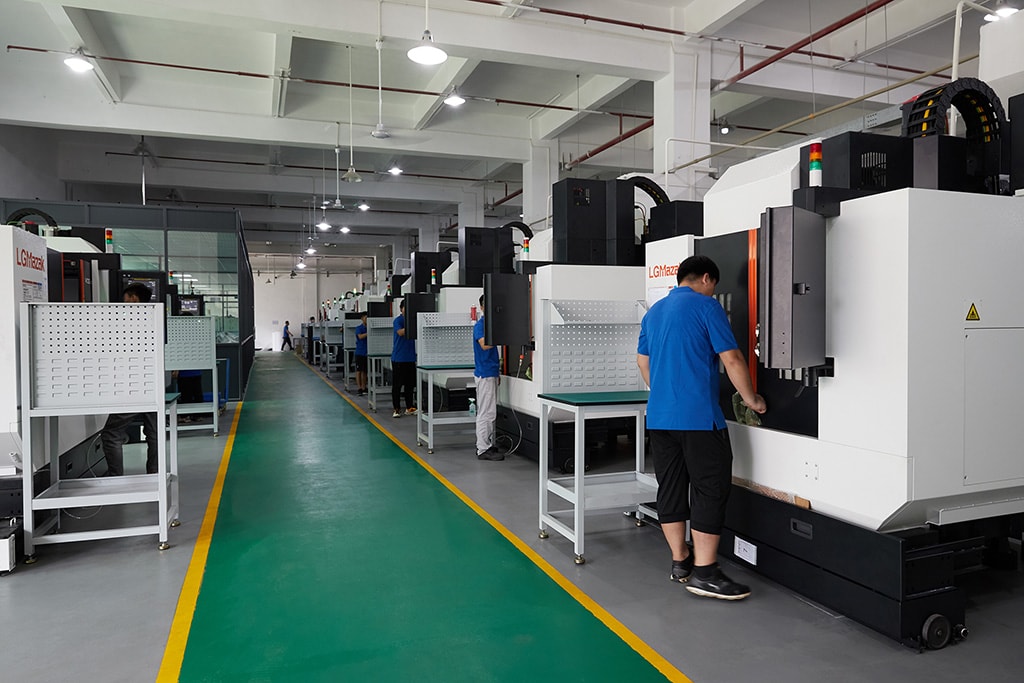
Then separate the order into stages with individual schedules. A prototype at one piece proves the geometry and finish on a fast track with expedited shipping; the production order at the real volume amortizes setup across the quantity and can use the slower freight mode. Order the prototype first, review the parts and the documentation, and release production only when the first article confirms the process. The buyers who hit their dates treat the model freeze, the quote review, and the freight selection as milestones with owners and dates — the same discipline that protects any sourcing schedule, applied to an order placed from a checkout screen. The factory page shows the floor behind the quoted lead times, and the services overview explains how machining, inspection, and finishing combine into one order.
Frequently Asked Questions
What is a realistic online CNC machining lead time?
An online quote shows a machining lead time set by the process estimate: simple parts from stocked material typically ship in days, while complex geometry, tough alloys, tight tolerances, or finishing move the estimate to weeks. Add the shipping leg — air is days, economy is longer. Read the quoted lead time and the delivery estimate as two schedules that add together.
What does the quoted lead time actually estimate?
It estimates the time the factory needs from order to dispatch: programming and scheduling, material, machining, inspection, and any finishing. The automated quote derives most of the machining time from the geometry, which is why a clean, manufacturable model produces a faster, more reliable lead-time estimate than a borderline one.
Why does a revision after ordering move the date?
Because most of the schedule is not cutting time. A revision restarts the process, can invalidate work already done, and may push the order to the back of the queue. Confirm the revision policy before ordering, and bundle related changes into one revision.
Do tight tolerances extend the lead time?
Yes. Features at ±0.003 mm add finishing passes and full measurement of each critical characteristic, and surfaces below what milling holds move to grinding, adding an operation and its inspection. Reserve the tight band for functional features if you want the schedule to stay short.
How does shipping add to the total time?
The delivery estimate depends on your location and the freight mode you select. Air freight is fast and suits prototypes and first articles; economy shipping suits production volume. The machining lead time and the shipping leg add together, so plan the arrival date as the sum of both.
How can a buyer protect the arrival date?
Upload a clean, final model with the production material, finish, and quantity, select the freight mode that fits the part's role, and check the revision policy before ordering. A model that needs no rework is an order that does not restart the schedule.
Should prototypes and production orders be planned separately?
Yes. Order a prototype at one piece to prove the geometry and finish, review it, then release production at the real volume. The prototype runs fast with expedited shipping; production amortizes setup across quantity and can use the slower freight mode.
Need an arrival date you can plan around?
Upload the final model with the material, finish, and quantity selected, and the quote will show the machining lead time and the delivery estimate together. Contact the Online CNC Machining team if the schedule is tight and the part needs a review before you commit.